I’m just a regular Fortnite player 🎮 who keeps an eye on the Epic Games Store for free cosmetics. Back during the May 2024 Epic Games Mega Sale, Epic handed out the Overclocked Combo Pack, which included the Codeshear Cloak Back Bling and the Grindspeed Wrap. As of 2026, that exact giveaway has ended, but the claiming method is still the same for most rotating free Fortnite add-ons. If Epic brings back a similar promotion—or drops another free combo pack during a future Mega Sale—this is exactly how I claim it without spending V-Bucks.
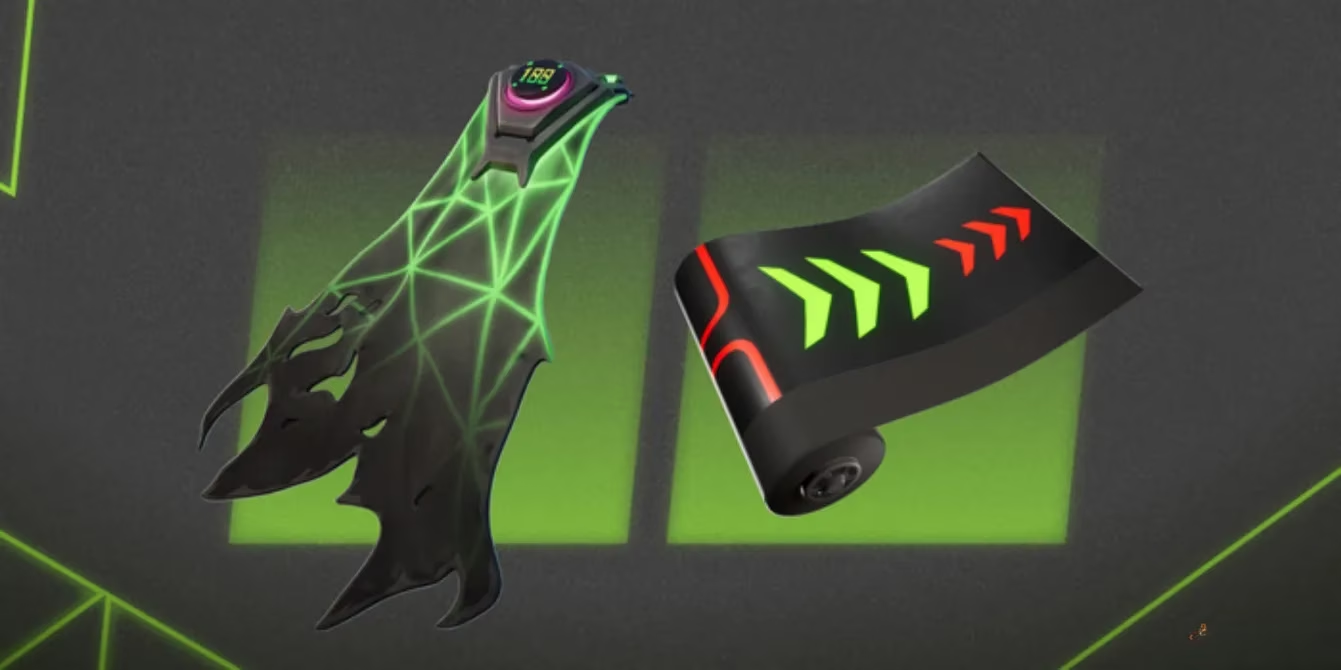
What Was in the Overclocked Combo Pack? 🎁
The Overclocked Combo Pack was a free DLC bundle on the Epic Games Store. It was not a Battle Pass reward, and it was not locked behind a V-Bucks purchase. That is what made it so appealing to me as a casual player. I could simply claim it, wait for the redemption to process, and then style my character with two new items.
| Item | Type | What I Noticed |
|---|---|---|
| Codeshear Cloak | Back Bling | A sleek, techy cloak that fits the overclocked theme |
| Grindspeed | Wrap | A fast-looking weapon wrap with bright, energetic colors |
The Codeshear Cloak Back Bling gave my outfit a sharper silhouette, while the Grindspeed Wrap made my weapons feel more customized. Neither item changed gameplay, but cosmetics are a huge part of Fortnite for me. Free cosmetics are even better.
How I Claimed It for Free
The process was surprisingly simple. I have claimed many free Epic Games Store items before, so I already knew the basic flow. Here is the exact routine I followed.
-
I opened the Epic Games Store. I could use either the launcher or the website, and both worked the same way for me.
-
I signed in to my Epic Games account. This is the most important step. The account must be the one connected to the Fortnite account where I want the items.
-
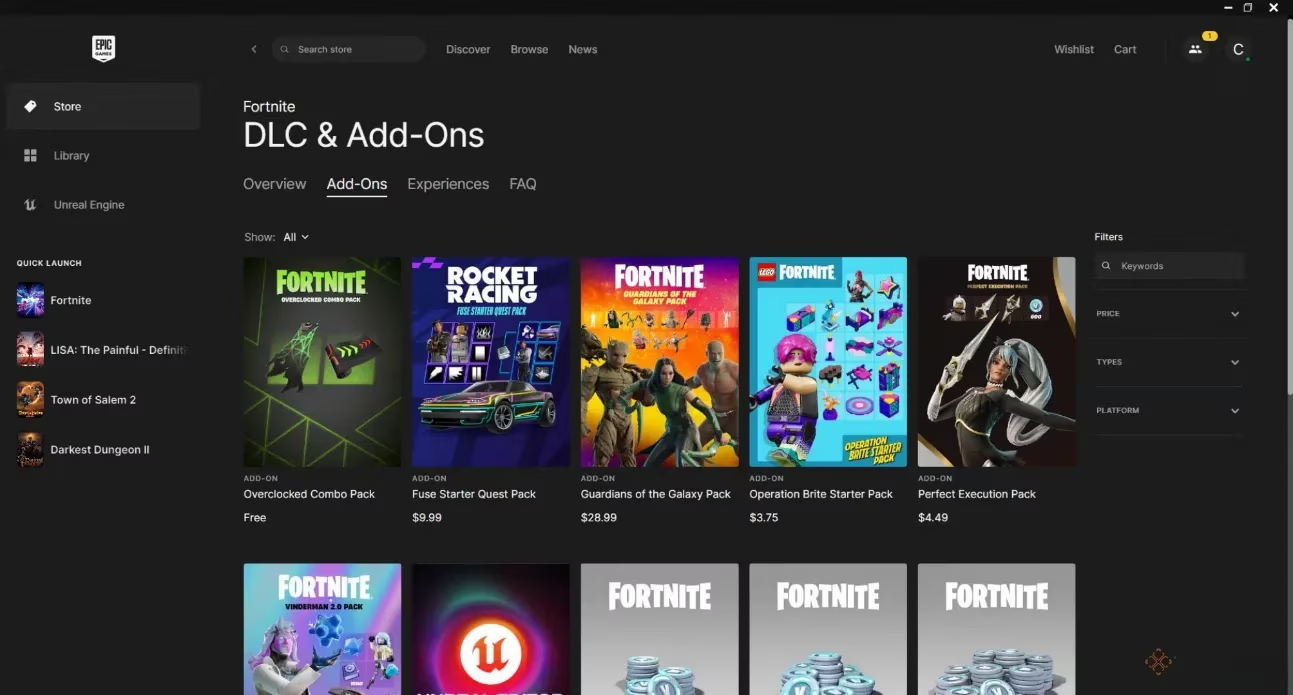
I navigated to the giveaway section at the top of the store. Epic often lists all current free promotions there. Alternatively, I could go to Fortnite’s page and click the Add-Ons section at the top.
-
I found the Overclocked Combo Pack. It appeared on the Fortnite DLC page with a free price.
-
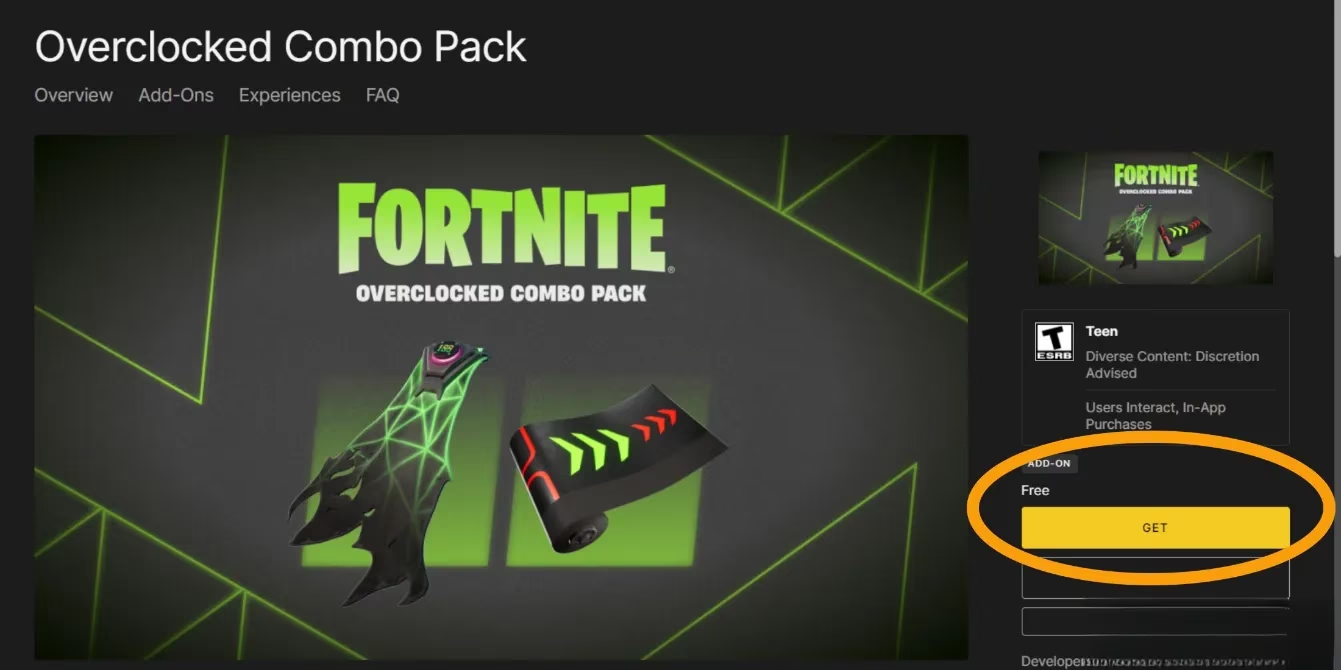
I clicked on the pack’s store listing and then clicked Get to begin redeeming it.
-
I continued through the purchase screen just like I would for any paid item. The total stayed at zero, so no payment was needed.
-
I launched Fortnite. The next time I logged in, I received a notification that my purchased items had been redeemed. The Codeshear Cloak Back Bling and Grindspeed Wrap were then available in my locker.
The purchase screen can feel strange because it looks like a checkout. I remember double-checking the total and making sure I was not accidentally buying something else. As long as the pack shows as free, the final cost should be zero.
The Account Trap That Almost Caught Me ⚠️
The biggest mistake I could have made was claiming the pack on the wrong Epic Games account. Epic does not ask which Fortnite account you want the item on after the fact. It sends the DLC to whatever Epic Games account is signed in at the time of redemption. That means if I had been logged into an old account, the cosmetics would have gone there instead.
For console players, this is especially important. If I wanted the pack on my PlayStation, Xbox, or Switch Fortnite account, I first needed to make sure that console account was connected to my Epic Games account. After linking it, I could claim the pack on the Epic Games Store website. The items would then appear on the connected console account when I logged in.
I also learned to check my email and Epic account notifications. Sometimes the redemption is instant, and sometimes it takes a few hours. If I did not see the items after a few hours, I would verify that I claimed the pack on the correct account before contacting support.
What I Do in 2026 for Similar Free Fortnite Items 🔄
Because the 2024 Overclocked Combo Pack promotion is over, I now treat it as a template rather than a permanent offer. In 2026, Epic Games Store still runs frequent sales and giveaways, and Fortnite still receives free add-ons from time to time. When a new Mega Sale or special event appears, I follow the same checklist.
-
I check the Epic Games Store giveaway section first.
-
I visit Fortnite’s store page and look at the Add-Ons section.
-
I confirm that the item is listed as free, not discounted.
-
I sign in to the correct Epic Games account before clicking Get.
-
I complete the zero-cost checkout and wait for the redemption notification.
-
I log into Fortnite and check my locker for the new Back Bling, Wrap, Pickaxe, or Outfit.
I also keep an eye on official Fortnite and Epic Games announcements. Free cosmetics can disappear quickly, and some promotions are only available for a limited time. Claiming early is always safer than waiting.
My Troubleshooting Checklist 🛠️
| Problem | What I Check |
|---|---|
| I do not see the pack | I refresh the store, check the giveaway section, and look under Fortnite Add-Ons |
| I cannot click Get | I make sure I am signed in and that my account region supports the promotion |
| The item is not in Fortnite | I restart the game, check my locker filters, and wait a few hours |
| The item went to the wrong account | I check which Epic Games account was signed in during redemption |
| I play on console | I confirm my console account is linked to Epic before claiming |
Final Thoughts ✨
The Overclocked Combo Pack was a small but satisfying freebie. The Codeshear Cloak Back Bling and Grindspeed Wrap did not give me an advantage, but they let me personalize my loadout without spending money. As a regular player, that is exactly the kind of promotion I appreciate.
In 2026, the specific 2024 giveaway is no longer live, but the method remains useful. If Epic Games offers another free Fortnite combo pack during a future sale, I will open the Epic Games Store, sign in to the right account, find the Add-Ons section, click Get, and complete the free checkout. Then I will launch Fortnite and enjoy whatever new cosmetic lands in my locker.
Details are provided by ESRB, reinforcing that packs like Fortnite’s Overclocked Combo Pack are purely cosmetic add-ons and don’t alter gameplay outcomes—so the key “win” is making sure you redeem the free DLC on the correct Epic account and then verify it appears in your locker after the next login.