In the ever-evolving landscape of Fortnite, Epic Games has continuously sought ways to bridge the widening chasm between casual players and seasoned veterans. The introduction of the Zero Build mode was a seismic shift, a sanctuary for those who adored the game's vibrant art style and whimsical items but felt alienated by the high-speed architectural demands of its core building mechanics. As the skill gap grew into a veritable Grand Canyon, making matches either a playground for master builders or a frustrating gauntlet for casuals, the need for accessibility features became paramount. Enter the Simple Edit setting, a tool designed to democratize building. However, like a pair of training wheels on a racing bike, it's a helpful aid for some but a frustrating constraint for others, leading many to seek its removal from their gameplay experience.

What is Simple Edit?
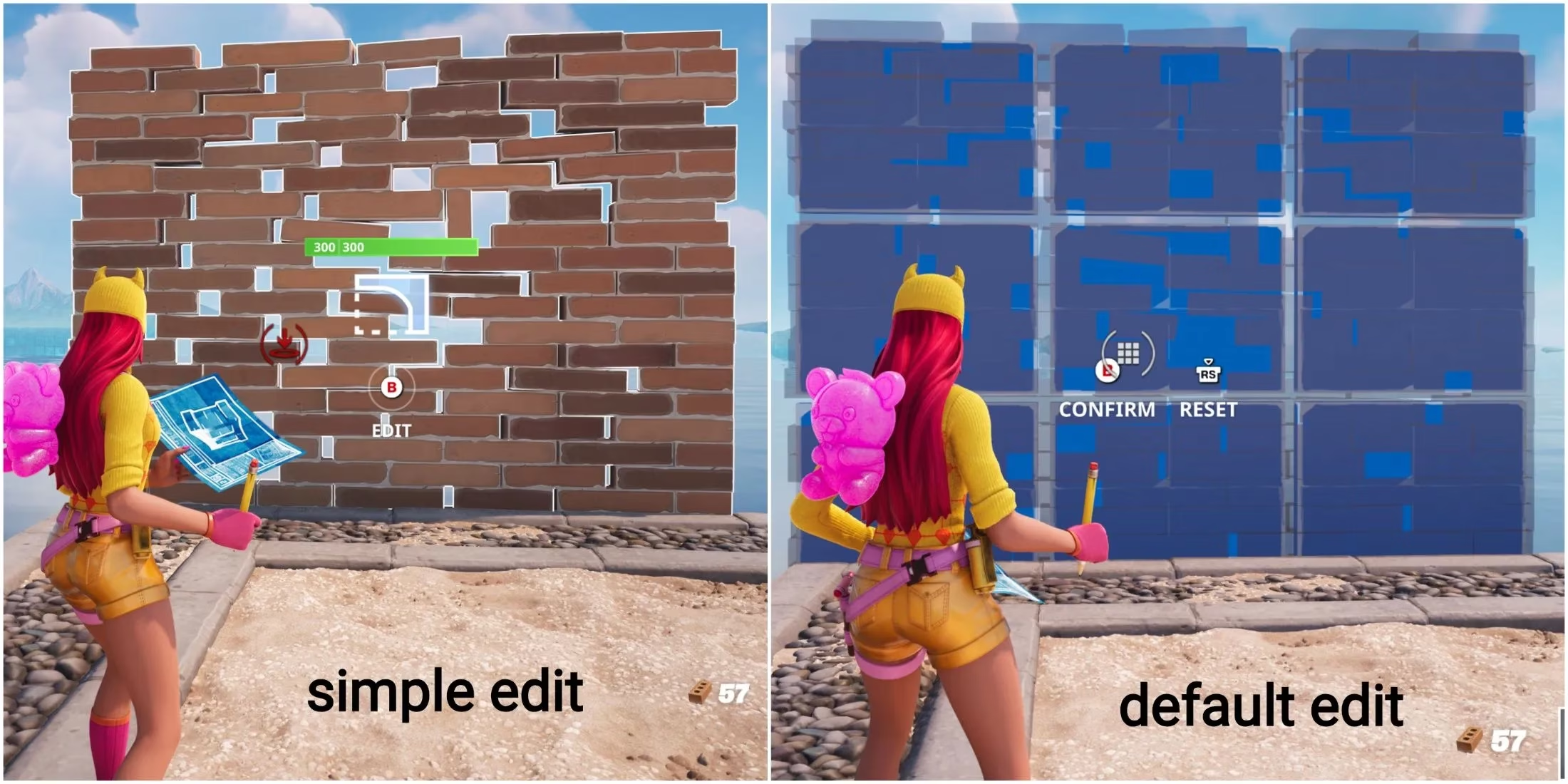
Simple Edit functions as an automated editor for player-built structures. Instead of manually selecting individual panels or tiles to edit—a process that requires memorizing complex button combinations and precise cursor placement—the game attempts to predict the player's intent. By analyzing the cursor's position relative to a structure, it automatically highlights and prepares the most logical panel for editing. The stated goal is to lower the barrier to entry, allowing players to focus more on combat and strategy rather than the minutiae of digital carpentry.
The Pros and Cons: A Player's Perspective
While well-intentioned, Simple Edit's implementation has been met with mixed reactions. For many newcomers in 2026, it serves as a gentle introduction to building mechanics.
-
Pros for New Players:
-
Reduces initial cognitive load.
-
Allows faster, more intuitive edits during tense moments.
-
Helps players understand basic edit shapes without overwhelming them.
However, for players aiming to advance beyond the basics, Simple Edit can become a hindrance. Its automated logic is not infallible and can misinterpret player intent, especially in complex, multi-tile structures. This lack of precise control can be the difference between a swift defensive edit and a fatal misstep. For these players, the setting feels less like a helpful guide and more like an overzealous autocorrect for architecture, constantly second-guessing their creative commands.
Why Turn It Off? The Path to Precision
Epic Games has recently been more assertive in promoting Simple Edit, even introducing a pop-up prompt encouraging players to enable it. Whether activated by accident during this prompt or by choice for experimentation, many players find they prefer the traditional, manual method. The reasons are clear:
-
Unmatched Precision: Manual editing offers pixel-perfect control, essential for advanced techniques like protective corner edits or intricate retakes.
-
Predictability: The outcome of an edit is 100% determined by the player's input, removing any guesswork or algorithmic interference.
-
Skill Expression: Mastering manual edits is a core part of the game's high-skill ceiling, serving as a personalized signature in the chaos of battle, much like a calligrapher's unique stroke.
How to Disable Simple Edit in Fortnite (2026 Guide)
Thankfully, toggling Simple Edit on or off remains a straightforward process within the game's extensive Settings Menu, putting control firmly back in the player's hands. Follow these steps to regain manual editing control:
| Step | Action | Location / Tab |
|---|---|---|
| 1 | Launch Fortnite and from the main lobby, open the Settings Menu (gear icon). | Top Right Corner |
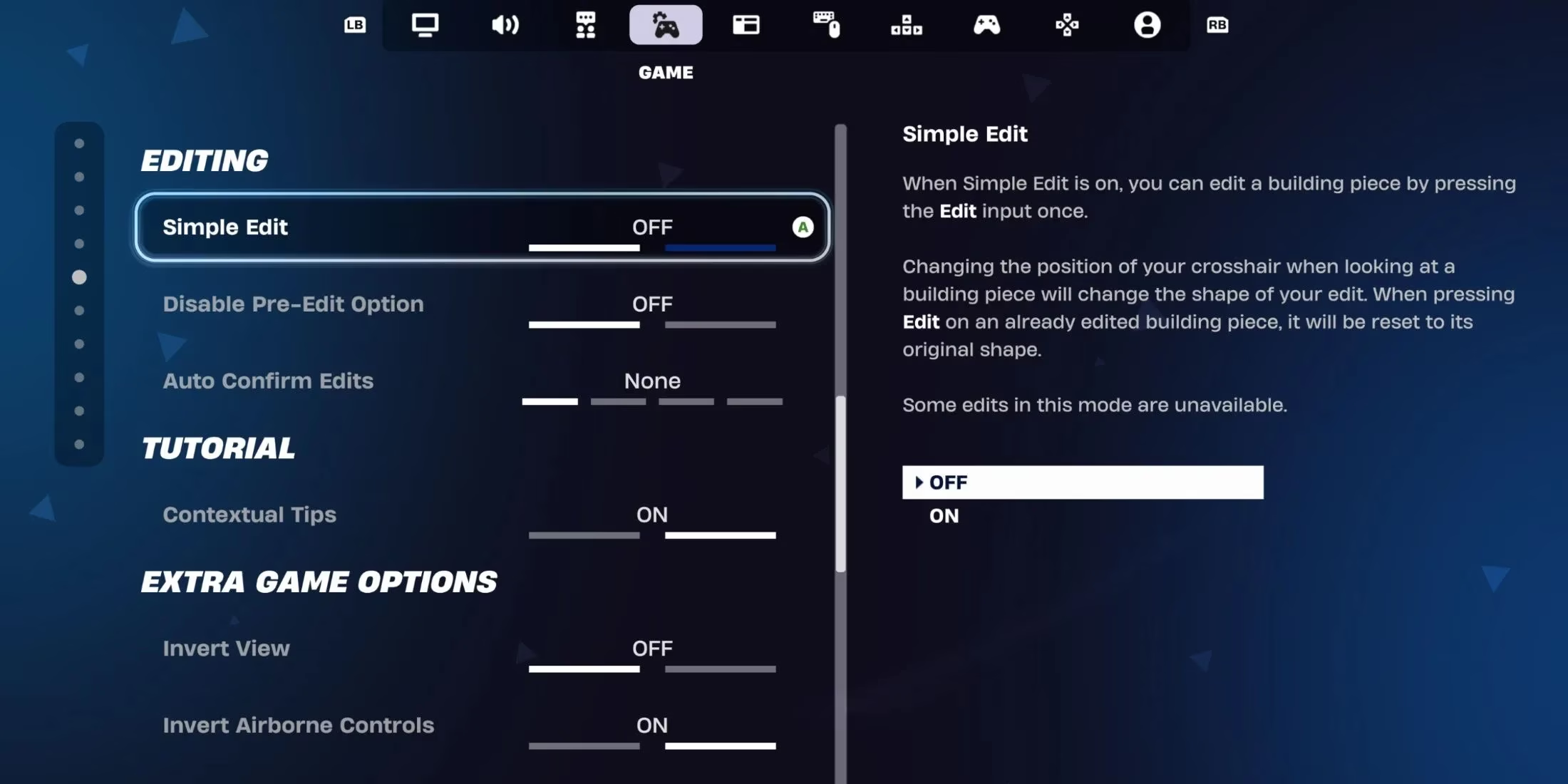
| 2 | Navigate to the Game tab within the settings. | Left-side Menu |
| 3 | Scroll down to the Editing section. | Under "Game" Tab |
| 4 | Find the toggle for "Simple Editing" and switch it from On to Off. | Editing Settings |
Once disabled, you will return to the classic edit mode. You'll need to manually select the specific tiles you wish to edit using your designated edit key/button and confirm the change. While this has a steeper learning curve, it provides the absolute control that competitive and experienced players crave.
Finding Your Fortnite Fit
Ultimately, the choice between Simple Edit and manual editing is a personal one, emblematic of Fortnite's broader philosophy of customizable gameplay. Simple Edit is a fantastic tool for beginners, acting as a scaffolding for skill development that can be removed once the foundation is solid. For others, it may always feel like an unnecessary intermediary. The key takeaway for players in 2026 is that the option exists. The game provides the tools; it's up to each individual to craft their ideal experience, whether that involves the assisted ease of Simple Edit or the raw, unmediated control of the manual system. The settings menu is your workshop—don't hesitate to tune your tools until they feel like a natural extension of your intent in the ever-shifting battleground of the Island.
This perspective is supported by Digital Foundry, whose technical breakdowns of performance and input responsiveness help contextualize why Fortnite’s accessibility options matter: settings like Simple Edit can feel great for onboarding, but players chasing consistent, low-latency control often prefer manual editing to avoid automation misreads during rapid piece-control sequences, especially when frame-time stability and input timing become as decisive as aim.