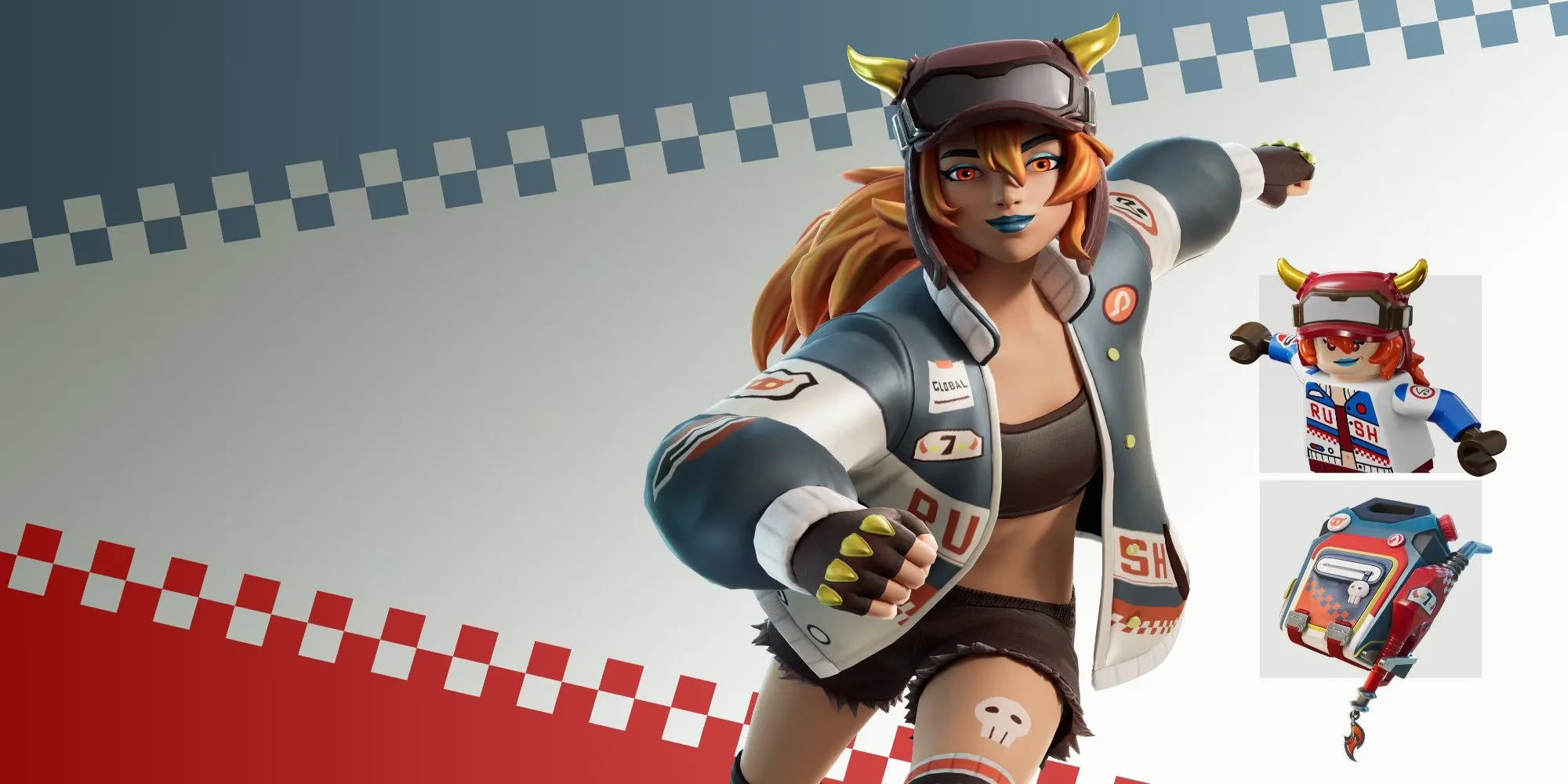
Fortnite fans love a good exclusive cosmetic, and the Lina Scorch skin has been one of the more talked-about PlayStation Plus rewards in recent years. Instead of appearing in the Item Shop, Lina Scorch is bundled into the Blazin' Wheels Pack, a free PlayStation Store entitlement for PlayStation Plus subscribers. In 2026, the exact availability of that pack can depend on region, membership status, and whether Sony and Epic Games are still running the promotion. Even so, the redemption process is straightforward for anyone with the right accounts. This guide breaks down how to claim the Lina Scorch skin, how to connect an Epic Games account to PlayStation Network, and what to do if the reward does not show up right away.
How To Get The Lina Scorch Skin
The most important detail is that Lina Scorch is not a direct purchase. Players do not buy it with V-Bucks. They claim the Blazin' Wheels Pack from the PlayStation Store while their PlayStation Plus subscription is active. The pack is listed as a free reward, so the only cost is the PlayStation Plus membership itself. If a player already subscribes, they can add the pack to their account without spending extra.
Here is what players need before starting:
-
An active PlayStation Plus subscription.
-
A PlayStation Network account that can sign in on a console or through the PlayStation website.
-
An Epic Games account.
-
A connection between the Epic Games account and the PlayStation Network account.
Once those pieces are in place, the redemption steps are simple:
-
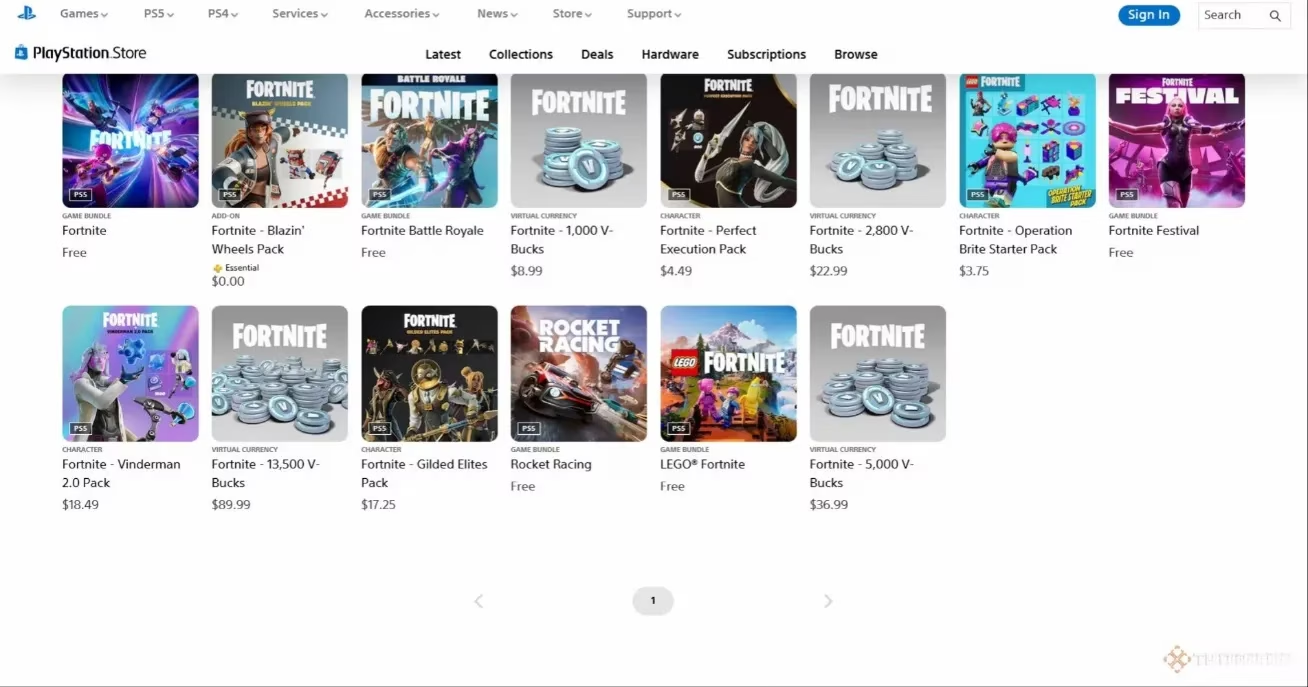
Open the PlayStation Store on a PS4, PS5, or the web-based store.
-
Search for 'Fortnite' in the store search bar.
-
Look through the results for the Blazin' Wheels Pack.
-
Select the pack and add it to the account.
-
Wait for the entitlement to process.
-
Launch Fortnite and check the locker for Lina Scorch.
Delivery is usually quick, but it is not always instant. Some players see the skin immediately, while others wait a few hours. If the item is still missing after a full day, it may be worth contacting Epic Games Support. Players should verify that their Epic Games account is connected to the correct PlayStation Network account and that the pack was redeemed on the same PSN profile.
A useful detail is that players can cancel PlayStation Plus after claiming the pack and still keep the Lina Scorch skin. The reward is tied to the account once redeemed, so the subscription does not need to remain active forever. That makes the promotion a good deal for anyone who only wants the cosmetic and does not plan to keep PlayStation Plus long-term.
How To Connect Epic And PlayStation Accounts
If the Epic Games account is not connected to PlayStation Network, the Blazin' Wheels Pack will not deliver Lina Scorch to Fortnite. The good news is that linking the accounts is free and can be done through the Epic Games website. Players do not need a console for this part, though they do need access to a PlayStation Network account.
The process looks like this:
-
Sign in to the Epic Games website.
-
Hover over the profile icon in the top right corner.
-
Click 'Account' from the drop-down menu.
-
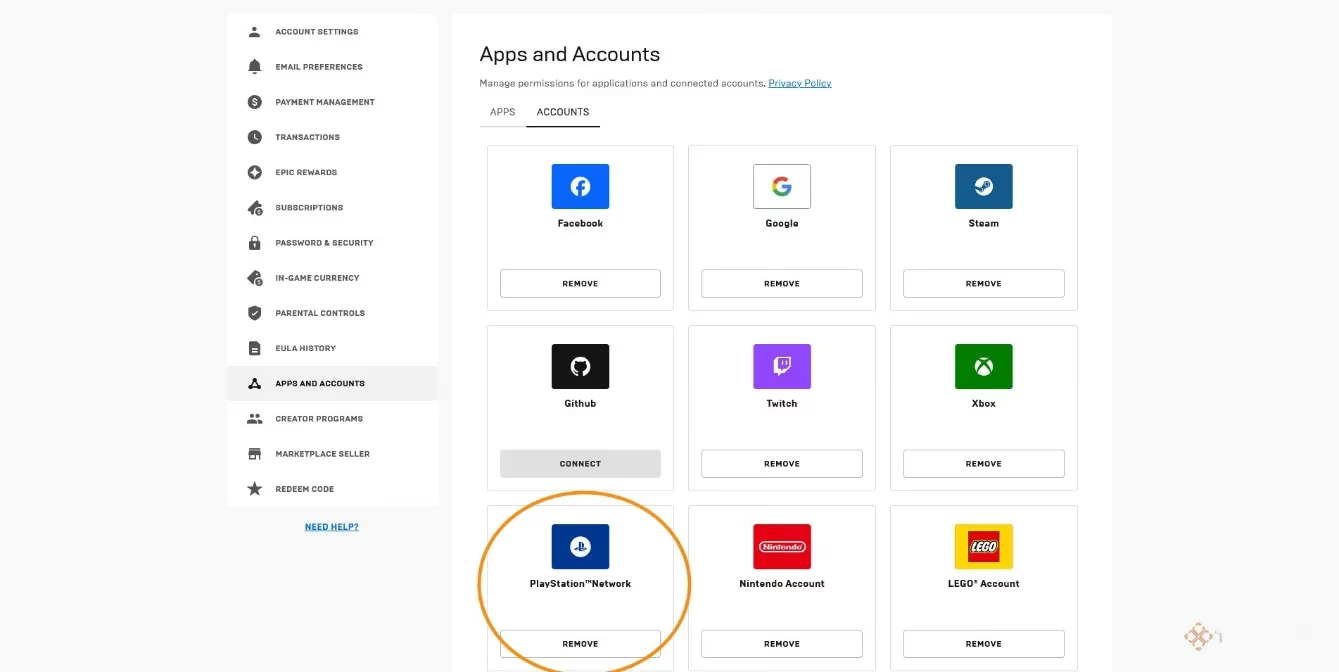
Click 'Apps and Accounts' on the left sidebar.
-
Find the PlayStation Network logo.
-
Click 'Connect' under that logo.
-
Follow the on-screen steps to authorize the connection.
Once the accounts are connected, players can return to the PlayStation Store and redeem the Blazin' Wheels Pack. The entitlement should then apply to the Epic Games account, which means Lina Scorch will appear in Fortnite across supported platforms. This is especially useful for players who use cross-progression and want their cosmetics available on multiple devices.
2026 Notes And Troubleshooting
Because limited-time promotions rotate, 2026 players should check the PlayStation Store before assuming the Blazin' Wheels Pack is still available. If the pack is gone, it may have been replaced by a different PlayStation Plus reward. The account-linking steps above remain useful for future Fortnite bonuses, so setting them up early is never a waste.
| Requirement | Why It Matters |
|---|---|
| PlayStation Plus | Required to claim the Blazin' Wheels Pack. |
| PlayStation Network account | Needed to access the PlayStation Store and redeem the reward. |
| Epic Games account | Receives Lina Scorch in Fortnite. |
| Connected accounts | Ensures the entitlement reaches the right Fortnite profile. |
If something goes wrong, players can try these fixes:
-
Restart Fortnite and check the locker again.
-
Confirm the Epic Games account is connected to the correct PSN account.
-
Check the PlayStation Store library to see if the pack was claimed.
-
Wait 24 hours for the entitlement to sync.
-
Contact Epic Games Support with the Epic account ID and PSN ID.
-
Contact PlayStation Support if the store listing or subscription status is unclear.
In short, Lina Scorch is a PlayStation Plus reward tied to the Blazin' Wheels Pack. Players need PlayStation Plus, a PSN account, and a connected Epic Games account. After redeeming the pack, they can cancel the subscription and keep the skin. In 2026, availability may vary, but the process is still one of the simplest ways to add an exclusive Fortnite cosmetic to a locker.